【MicroROS手册01】简介
00 相关链接
0.1 官方教程
官方 Tutorial: https://micro.ros.org/docs/tutorials/core/overview/
【官方文档必须首推】很多视频教程模糊的地方,官方文档讲得很清楚。
官方文档的 Overview 中叙述了 Tutorial 的大纲:
- First micro-ROS application on Linux / RTOS
- Programming with rcl and rclc
- Advanced Tutorials
第一部分,是入门,基本上可以通过网上的视频教程平替。在实际操作过程中,可以通过platformIO 几乎可以解决编译和烧录的所有问题。
第二部分,是核心,着重叙述了rcl和rclc的关系。rcl是ROS Client Library;rclc是micro-ROS C API。下面这段话很好的阐述了两者的关系。
[!quote] 摘自 Programming with rcl and rclc: Oerview
In this section, you’ll learn the basics of the micro-ROS C API: rclc.
The major concepts (publishers, subscriptions, services, timers, …) are identical with ROS 2. They even rely on the same implementation, as the micro-ROS C API is based on the ROS 2 client support library (rcl), enriched with a set of convenience functions by the package rclc. That is, rclc does not add a new layer of types on top of rcl (like rclcpp and rclpy do) but only provides functions that ease the programming with the rcl types. New types are introduced only for concepts that are missing in rcl, such as the concept of an executor.
第三部分,是进阶。涉及很多细节的东西,很多疑难问题的答案都在里面。到这个阶段,可以结合MicroROS官方提供的 example 一起学习。
0.2 B 站教程
ROS 2 安装方法:
古月居安装 ROS2 文档: https://book.guyuehome.com/ROS2/1.%E7%B3%BB%E7%BB%9F%E6%9E%B6%E6%9E%84/1.3_ROS2%E5%AE%89%E8%A3%85%E6%96%B9%E6%B3%95/
鱼香 ROS(推荐,保姆级):
鱼香 ROS 的 MicroROS 视频: https://space.bilibili.com/1940177928/channel/collectiondetail?sid=1180340
鱼香 ROS 的 MicroROS 文档: https://fishros.com/d2lros2/#/humble/chapt13/%E7%AB%A0%E8%8A%82%E5%AF%BC%E8%AF%BB
照样同学(不是卖课):
B 站视频: https://space.bilibili.com/384071680/channel/collectiondetail?sid=1346753
01 What is MicroROS?
1.1 功能
Micro-ROS 提供了七项关键功能,可以在基于微控制器的机器人项目中使用:
- 支持所有主要 ROS 概念的微控制器优化客户端 API
- 与 ROS 2 无缝集成
- 极度资源受限但灵活的中间件
- 通用构建系统支持多 RTOS
- 充满活力的社区和生态系统
- 长期可维护性和互操作性
1.2 分层和模块化架构
Micro-ROS 遵循 ROS 2 架构,并利用其中间件可插拔性来使用针对微控制器进行了优化的 DDS-XRCE。此外,它使用基于 [[POSIX - UNIX的标准|POXIS]] 的 RTOS(FreeRTOS、Zephyr 或 NuttX)而不是 Linux。
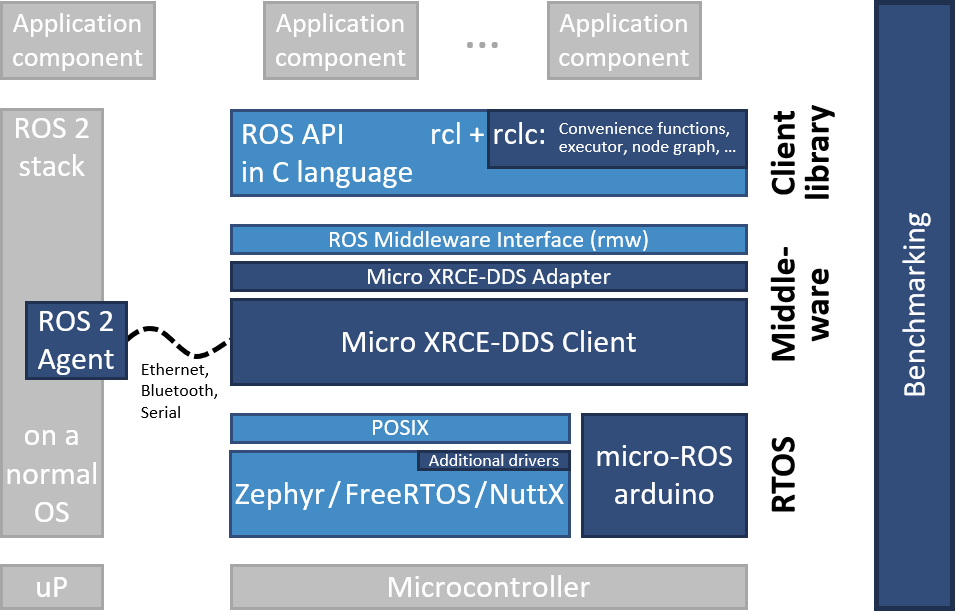
1.3 ROSSerial / MicroROS 对比
| rosserial | RIOT-ROS2 | micro-ROS | |
|---|---|---|---|
| OS | bare-metal | RIOT | NuttX, FreeRTOS and Zephyr |
| Communications architecture | Bridged | N/A | Bridged |
| Message format | ROS1 | N/A | CDR (from DDS) |
| Communication links | UART | UART | UART, SPI, IP (UDP), 6LowPAN, … |
| Communication protocol | Custom | NDN | XRCE-DDS (or any rmw implementation) |
| Code Base | Independent implementation | Standard ROS 2 stack up to RCL | Standard ROS 2 stack up to RCL (RCLCPP coming) |
| Node API | Custom rosserial API | RCL,RCLC | RCL (soon RCLCPP) |
| Callback execution | Sequential, in order of messages | N/A | Choice of ROS 2 executors or MCU optimized executors |
| Timers | Not included | Not included | Normal ROS 2 timers |
| Time sync to host | Custom | N/A | NTP/PTP |
| Lifecycle | Not supported | Partial | Partial, full coming |
02 开发环境搭建
2.1 上位机:Agent by Docker
MicroROS支持多种通信协议并依赖Agent。所谓Agen,其实就是一个代理,微控制器可以通过串口,蓝牙、以太网、Wifi等多种协议将数据传递给Agent,Agent再将其转换成ROS2的话题等数据,以此完成通信。
为了方便,这里采用docker搭建Agent,常用的通讯方式有 UDP方式 和 Serial方式。
1 | # UDPv4 micro-ROS Agent |
2.2 单片机:PlatformIO中的Arduino框架
[!warning] 请使用 Ubuntu
一定要在 Ubuntu 下使用 PlatformIO,编译脚本对于windows不太支持。
(也有可能是我的打开方式不对,Orz)
我使用的单片机开发版是 ESP32 和 ESP32-S3。
2.2.1 配置 platformio.ini
ESP32使用的配置是
1 | [env:esp32dev] |
ESP32-S3使用的配置是
1 | [env:esp32-s3-devkitc-1] |
在 platformio.ini 中添加 MicroROS库 的链接:
1 | lib_deps = |
鱼香ROS还提供了他的链接,解决网络方面的问题:
1 | lib_deps = |
2.2.1 测试案例:第一个MicroROS节点
1 |
|
上传,烧录。
1 | # 启动docker上位机 |
重启开发板。
1 | # 列出在线的节点 |
 wechat
 alipay